
EICR Certificate Maker
Fill in an Electrical Installation Condition Report, check the readings against the limits and save it as a PDF.
Saved in this browser
Nothing saved in this browser yet.
Finish
EIC and EICR trial: 14 day(s) left.
21 thing(s) still to fill in
- Certificate or report number
- Date of issue
- Client name
- Address of the installation
- Company or contractor name
- Purpose of the report
- Date(s) of inspection and testing
- Extent of the installation covered
- Earthing arrangement
- Surge protective device (SPD) type
- SPD status indicator
- Overall assessment
- Next inspection recommended by
- At least one circuit in the schedule of test results
- Observations or inspection outcomes
- Schedule of inspections (most items still empty)
- Signature: inspector
- Signature: authoriser
- Agreed limitations (what was not inspected or tested)
- External earth fault loop impedance, Ze
- Prospective fault current, Ipf
Free · runs in your browser · nothing is uploaded
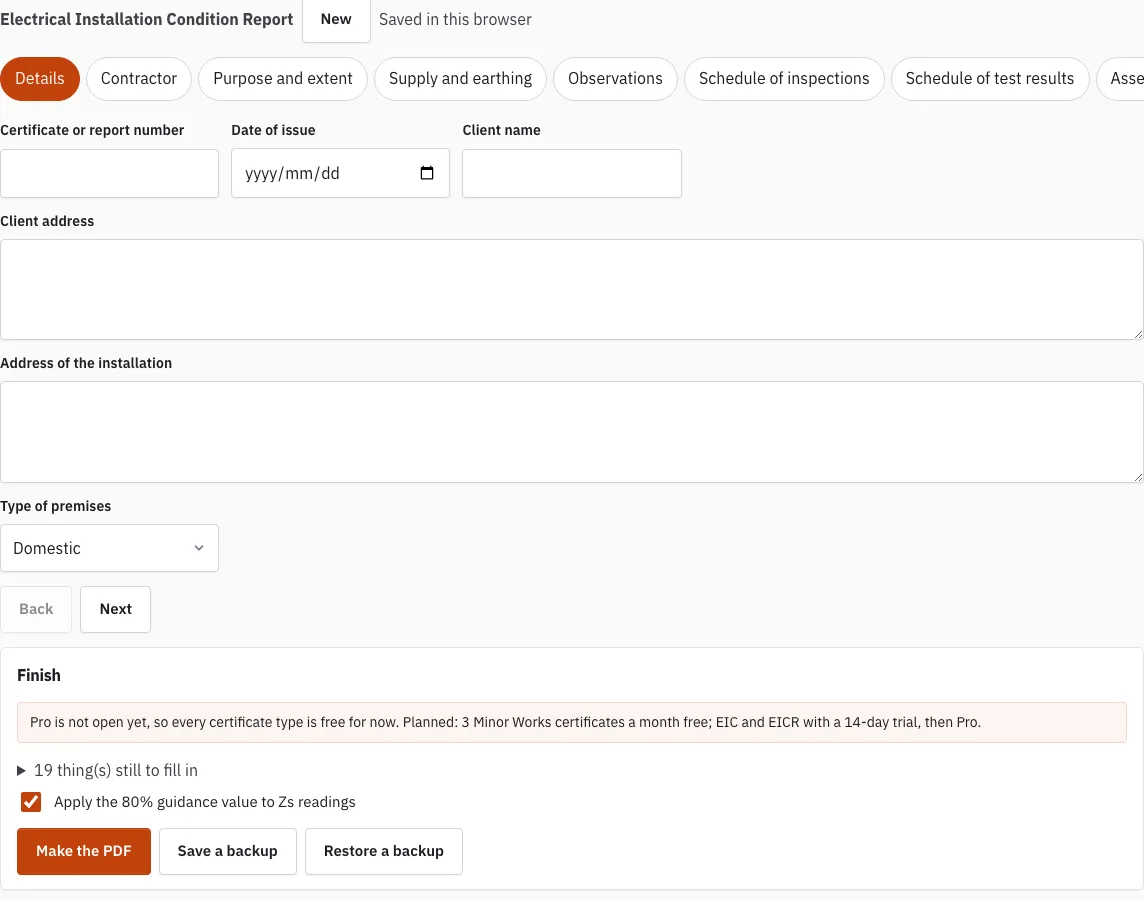
How to use the EICR Certificate Maker
- Click New to start an empty certificate, or open an earlier one from Saved in this browser.
- On Details, enter the client and the installation address. On Purpose and extent, enter the purpose, the extent, the limitations and the inspection date.
- On Contractor, check your company name, address, contact details and registration scheme and number. These are filled into the next new certificate.
- Complete Supply and earthing, then add observations on the Observations tab. Use Add a typical observation to pick from the library of 18 and edit the wording to suit the job.
- On Schedule of inspections, set each item to Acceptable, C1, C2, C3, FI, Limitation or Not applicable, and add a note where needed. Click Mark every empty item acceptable only if that matches what you found.
- On Schedule of test results, use Add a circuit, Copy this circuit or Delete this circuit to manage rows, and Add a board for another distribution board. Read the status line under each circuit.
- On Assessment and next inspection, check the suggested assessment, click Use this assessment or choose your own, then set the next inspection date.
- On Signatures, sign each block with a finger or pen. Use Clear signature to start again.
- Open Finish, check the list of empty items and the count of readings outside a limit, then click Make the PDF.
Use Back and Next to move between tabs, and Save a backup to keep a file.
What does EICR stand for?
EICR stands for Electrical Installation Condition Report. It is the report written when an existing installation is inspected and tested. It records the condition of the wiring, equipment and protective devices as they are found, which is different from the certificate that goes with a new installation.
What is in an EICR report?
An EICR report describes the condition of an electrical installation at the time of inspection. The tabs in this tool follow its parts: details, contractor, purpose and extent, supply and earthing, observations, inspections, test results, assessment and signatures. Each observation carries a code, C1, C2, C3 or FI, so the reader can see how urgent each issue is.
For the test results, the tool checks some readings as you type them. For a type B, C or D MCB or RCBO, the maximum Zs is worked out as 0.95 x 230 V divided by the instantaneous trip current, which is 5, 10 or 20 times the rating. Insulation resistance, RCD trip times and ring final readings are compared with their limits in the same way, and a device’s short-circuit capacity is compared with the prospective fault current. Every result the tool flags is a prompt for the certifying electrician to check, not a decision.
What the completeness check looks for
The Finish tab lists what is still empty before you sign: the client and the installation address, the purpose, the extent, the inspection date, the earthing arrangement, the overall assessment, the next inspection date, at least one circuit with a Zs reading, observations or inspection outcomes, and the signatures. It never blocks the PDF; it is a list to work through.
Who can carry out an EICR?
A qualified electrician carries out the inspection and testing. The Contractor tab records who did the work, including the registration scheme and number. The first signature block covers inspection and testing, and the second, for authorised issue, records who released the report.
When is the next inspection due?
The report recommends a date for the next inspection, and the Assessment tab has a date field for it. For a privately rented home in England the law sets a maximum of five years; see how long an EICR is valid for for the intervals by type of premises.
How this tool works and where the numbers come from
The layout follows the information the model forms in Appendix 6 of BS 7671:2018+A4:2026 ask for; limits are calculated from the formulas in BS 7671, with the regulation number shown.
Sources
- BS 7671:2018+A4:2026 Requirements for Electrical Installations (IET Wiring Regulations): publisher page, bibliographic reference; not checked against the printed text (BS 7671:2018+A4:2026) · checked
- IET: model forms for BS 7671 (the IET's own free page; WiringCert does not reproduce them) (BS 7671:2018+A4:2026 model forms) · checked
- IET Wiring Matters, July 2026: Implications of BS 7671:2018+A4:2026 on EICRs, further investigation (read) (Wiring Matters, Issue 110, July 2026) · checked
Frequently asked questions
Is an EICR a legal requirement?
For privately rented homes in England, yes: the 2020 regulations require the electrical installation to be inspected and tested at least every five years. Rules differ for other kinds of property and other nations, so check the rules that apply to yours.
Does a new installation need an EICR?
A new installation or a new circuit is certified with an Electrical Installation Certificate instead. See the Electrical Installation Certificate page.
Can I come back to a half-finished report?
Yes. Entries are saved in this browser a moment after each change, and Saved in this browser lists earlier certificates to reopen or remove. For a copy outside the browser, use Save a backup and reopen it later with Restore a backup.
Does the PDF copy the IET forms?
No. The PDF is made in the WiringCert layout and is based on the model forms in Appendix 6 of BS 7671:2018+A4:2026. It is not a copy of the IET forms.
What does the 80% tick box do?
When you tick Apply the 80% guidance value to Zs readings, the tool adds a warning if a Zs reading is inside the maximum but above 80% of it. The 80% figure is a field practice, not a regulation, so treat the warning as a prompt to look again.
What does “rule review pending” mean?
It means that rule has not yet been checked against the printed BS 7671:2018+A4:2026 text. Check the reading against the standard yourself before you rely on the result.
Related tools
- Electrical Installation Certificate (EIC): use this for a new installation, a new circuit or a new consumer unit.
- Minor Works Certificate: use this for an addition or alteration that does not create a new circuit.
- EICR Certificate Template: use this to print a blank report in the same layout.
- Schedule of Test Results: use this when you only need the circuit-by-circuit readings.
- Which Electrical Certificate Do I Need?: use this if you are not sure which certificate fits the job.
- EICR Codes: C1, C2, C3 and FI: use this to decide the code for an observation.
- EICR Report: Overall Assessment: use this to check the overall assessment from your counts.
- Maximum Zs Values for MCBs and RCBOs: use this to see the Zs limits behind the checks.