
EICR Report: Overall Assessment
Count your observations to see whether the report is satisfactory, and check the report covers everything it should.
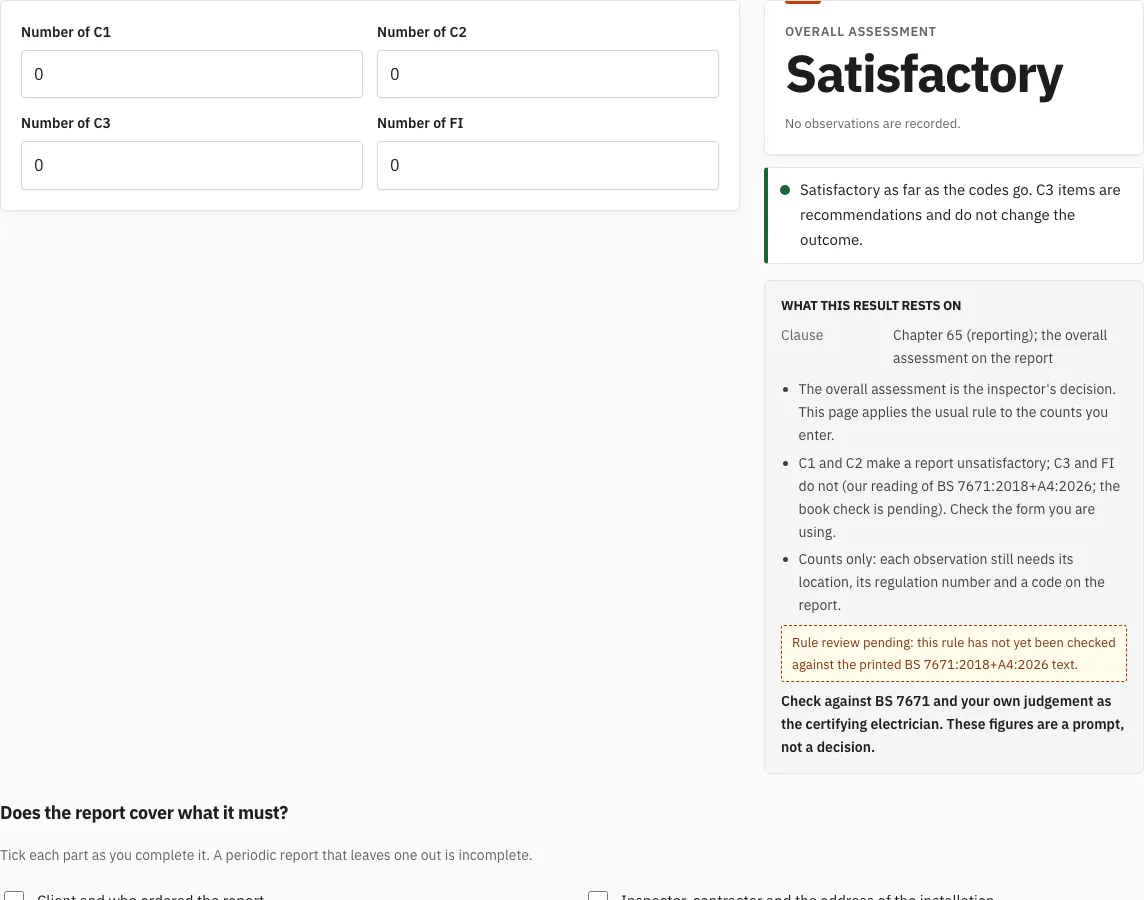
Overall assessment
Satisfactory
No observations are recorded.
Satisfactory as far as the codes go. C3 items are recommendations and do not change the outcome.
Does the report cover what it must?
Tick each part as you complete it. A periodic report that leaves one out is incomplete.
0 of 10 parts complete
Free · runs in your browser · nothing is uploaded
How to use the EICR Calculator
- Enter the number of C1 observations found during the inspection.
- Enter the number of C2 observations.
- Enter the number of C3 observations.
- Enter the number of FI observations. These are shown separately: an FI does not change the overall outcome, but further investigation is advised.
- Read the overall assessment that the calculator returns.
- Work through the contents check, which has ten parts to tick, from the client details to the recommended date of the next inspection. The counter shows how many parts are complete.
- When the report is ready to write up, open the EICR Certificate Maker from the link on the page.
The contents check is the quickest way to see what is still missing from the report. Each observation also needs its location, regulation and code recorded on the report itself, and the calculator does not check that for you.
Change a count and the assessment changes straight away; nothing is stored. If you only have the report in front of you, count each observation code once per observation, not once per page. Observations ticked as C1 or C2 in the schedule of inspections count too, so enter them as well. When the result mentions FI, go back to those items and record the outcome of the further investigation.
What is an EICR report for?
An EICR, short for electrical installation condition report, records the condition of an existing electrical installation. It is produced from a periodic inspection under BS 7671 Chapter 65, Regulations 651 to 653, and “EICR report” and “electrical installation condition report” refer to the same document. The inspector gives each fault found an observation code, and those codes drive the overall result. The codes are explained on the EICR Codes page.
What would fail an EICR?
An EICR is unsatisfactory when it contains any C1 or C2 observation. The table below shows how the counts translate into the overall assessment.
| Observations entered | Overall assessment |
|---|---|
| Any C1 or any C2 | Unsatisfactory |
| No C1 or C2, but at least one FI | Satisfactory, with further investigation advised for the FI items |
| Only C3, or no observations | Satisfactory |
Because the result is a prompt for the certifying electrician, the final judgement on any FI rests with them.
Does the report cover what it must?
A periodic report is incomplete if it leaves a part out. Work through these ten parts, which are the same as the contents check on this page:
- Record the client and the person who ordered the report.
- Record the inspector, the contractor and the address of the installation.
- State the purpose of the report and the extent of the installation covered.
- List the agreed limitations, meaning anything that was not inspected or tested.
- Record the supply and earthing arrangement.
- Enter every observation with its code, location and regulation.
- Complete the schedule of inspections and the schedule of test results.
- Add the inspector declaration and signature.
- Set the recommended date of the next inspection.
- Open the EICR Certificate Maker to produce the report.
How often is an EICR required?
The interval depends on the type of property. Here is how the periods work:
| Property | When an EICR is due |
|---|---|
| Owner-occupied home | Every 10 years (recommended), or sooner at a change of occupancy |
| Privately rented home in England | At least every 5 years (the legal maximum), or sooner if the report says so |
For a rented home, the 5-year interval is the one set by the regulations. For more on how long a report stays valid, see How Long Is an EICR Valid For?.
How do the four codes feed the result?
Each observation on the report carries one code. C1 (danger present) and C2 (potentially dangerous) each make the overall assessment unsatisfactory, however many C3 items there are. C3 (improvement recommended) never does by itself. FI (further investigation) records something that could not be fully assessed. Under A4:2026, as we read it, it does not change the overall outcome either, but further investigation is advised. Enter the counts in the calculator and the result updates as you type; the counts are not saved or sent anywhere.
The result is only the overall assessment. Each observation still needs its location, its regulation number and its code written on the report, and the EICR Codes page helps with choosing the code.
How this tool works and where the numbers come from
The rule follows the way codes decide the overall assessment on the EICR model form; the England time limit is from the 2020 regulations.
Sources
- BS 7671:2018+A4:2026 Requirements for Electrical Installations (IET Wiring Regulations): publisher page, bibliographic reference; not checked against the printed text (BS 7671:2018+A4:2026) · checked
- IET: model forms for BS 7671 (the IET's own free page; WiringCert does not reproduce them) (BS 7671:2018+A4:2026 model forms) · checked
- The Electrical Safety Standards in the Private Rented Sector and Social Rented Sector (England) Regulations 2020, SI 2020/312, current text (reg 3 read) (latest available (revised) text on legislation.gov.uk) · checked
- GOV.UK: Electrical safety standards in the private rented sector, guidance for landlords, tenants and local authorities (published 1 November 2025) · checked
- IET Wiring Matters, July 2026: Implications of BS 7671:2018+A4:2026 on EICRs, further investigation (read) (Wiring Matters, Issue 110, July 2026) · checked
- SI 2025/1043, Electrical Safety Standards in the Private Rented Sector (England) (Amendment) (Extension to the Social Rented Sector) Regulations 2025 (contents and reg 1 read) (latest available (revised) text on legislation.gov.uk) · checked
Frequently asked questions
Who needs an EICR?
Privately rented homes in England must have one, under the regulations for private rented properties. For an owner-occupied home there is no such legal requirement; a 10-year interval is the recommended maximum.
What happens if an EICR is unsatisfactory in a rented home?
Where the report requires remedial work or further investigation, it must be completed within 28 days, or within any shorter period the report states (regulation 3(4) of the Electrical Safety Standards in the Private Rented Sector (England) Regulations 2020). That includes the further investigation an FI calls for.
Does an FI make the report unsatisfactory?
No. Under A4:2026, as we read it, an FI does not change the overall outcome, so the calculator shows Satisfactory when the only observations are C3 or FI, and says that further investigation is advised for the FI items. Record what the investigation finds.
Where do I record the overall assessment?
In the Assessment tab of the EICR Certificate Maker. It suggests a result from your observation codes and lets you choose your own.
Can I use the calculator without a report in front of me?
Yes, for a quick check: enter the counts you expect and see the result. For the report itself use the EICR Certificate Maker, which keeps the observations and works out the same suggestion.
Are the counts saved?
No. The calculator stores nothing; the link in the address bar keeps the numbers if you copy it.
Related tools
- EICR Certificate Maker: use this to produce the finished report once the observations are recorded.
- EICR Codes: C1, C2, C3 and FI: use this to check what each observation code means before you assign one.
- EICR Checklist: use this to run through the inspection points before you write up the report.
- How Long Is an EICR Valid For?: use this to work out when the next inspection falls due.
- Maximum Zs Values for MCBs and RCBOs: use this when you need to check earth fault loop impedance against device limits.
- Schedule of Test Results: use it to record the test readings the report refers to.