
Electrical Installation Certificate (EIC)
Fill in an EIC for new work, check the test results against the limits and save it as a PDF.
Saved in this browser
Nothing saved in this browser yet.
Finish
EIC and EICR trial: 14 day(s) left.
17 thing(s) still to fill in
- Certificate or report number
- Date of issue
- Client name
- Address of the installation
- Company or contractor name
- The installation is
- Description of the work or installation
- Earthing arrangement
- Surge protective device (SPD) type
- SPD status indicator
- Next inspection recommended after
- At least one circuit in the schedule of test results
- Signature: designer
- Signature: constructor
- Signature: inspector
- External earth fault loop impedance, Ze
- Prospective fault current, Ipf
Free · runs in your browser · nothing is uploaded
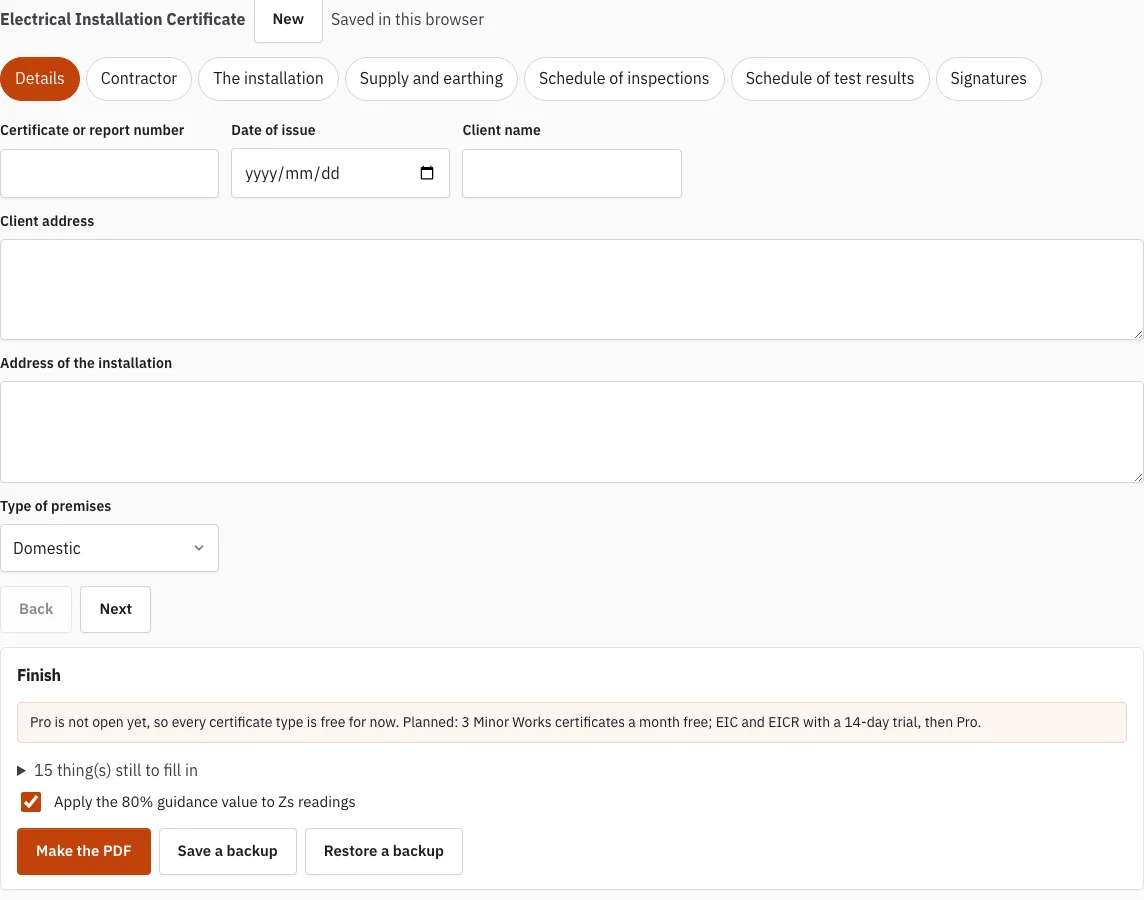
How to use the Electrical Installation Certificate editor
- Press “New” to start an empty certificate, or open an earlier one from the saved list.
- Complete the Details tab, then the Contractor tab. Your contractor details are filled into the next new certificate you start.
- On The installation tab, choose new installation, addition or alteration, then describe the work and list any departures from BS 7671 with their risk assessment.
- Complete Supply and earthing, including the earthing arrangement and the external earth fault loop impedance Ze.
- In Schedule of inspections, mark each item Acceptable, Limitation or Not applicable.
- In Schedule of test results, press “Add a circuit” for each circuit. Use “Copy this circuit” or “Delete this circuit” to manage rows, and “Add a board” for another distribution board.
- Enter the readings for each circuit. A status line appears under the circuit for each finding.
- Move between tabs with “Back” and “Next”.
- In Signatures, draw each signature with a finger or pen. Press “Clear signature” to start again.
- Press “Finish” to see how many readings are outside a limit and which fields are still empty.
- Press “Make the PDF”, or “Save a backup” to keep a copy you can restore later.
Use “Restore a backup” to open a backup file saved earlier. The PDF uses A4 portrait pages, with the schedule of test results on landscape pages.
What information is required to complete this form?
An electrical installation certificate needs the client and installation details, the contractor’s details, the installation type and work description, the supply and earthing data, and the test results for every circuit. The editor collects these across its tabs, and Finish lists anything still empty.
- Contractor: company name, address, phone, email, and registration scheme and number.
- The installation: new installation, addition or alteration; a description of the work; departures from BS 7671 with the risk assessment; and the recommended years until the next inspection.
- Supply and earthing: earthing arrangement (TN-S, TN-C-S, TT, TN-C or IT), phases and wires, nominal voltages, frequency, prospective fault current Ipf in kA, Ze, supply device, main switch, main RCD, earthing and bonding conductors with sizes, and bonding to water, gas, oil, structural steel and lightning protection. For TT, add the electrode type and resistance Ra.
An EIC covers a new installation, a new circuit or a new consumer unit. Certification of new work follows BS 7671 Chapter 64 (Reg 644). An alteration to an existing circuit that adds no new circuit uses the Minor Works certificate instead.
How is a Zs reading checked against its limit?
The editor compares each Zs reading with the maximum for the protective device as you type. For a type B, C or D MCB or RCBO, the maximum is worked out as 0.95 x 230 V divided by the instantaneous trip current, which is 5, 10 or 20 times the rating. For a fuse or other device, you type in the maximum Zs from the device data.
| Device | Instantaneous trip current | Maximum Zs |
|---|---|---|
| Type B MCB or RCBO | 5 times the rating | 0.95 x 230 V divided by (5 x rating) |
| Type C MCB or RCBO | 10 times the rating | 0.95 x 230 V divided by (10 x rating) |
| Type D MCB or RCBO | 20 times the rating | 0.95 x 230 V divided by (20 x rating) |
| Fuse or other device | Not calculated | Typed in from device data |
The tick box “Apply the 80% guidance value to Zs readings” adds a warning when a reading is inside the maximum but above 80% of it. The 80% figure is a field practice, not a regulation.
The editor makes other checks too: insulation resistance against the minimum for the circuit voltage, RCD trip times at 1 x and 5 x IΔn, ring final readings r1, rn and r2 against each other, device short-circuit capacity against the prospective fault current, and TT resistance Ra against 50 V divided by the RCD rating. Where a rule has not yet been checked against the printed BS 7671:2018+A4:2026 text, the status line says “rule review pending”. Every result is a prompt for the certifying electrician to review, not a decision.
How this tool works and where the numbers come from
The layout follows the information the model forms in Appendix 6 of BS 7671:2018+A4:2026 ask for; limits are calculated from BS 7671 formulas, with the regulation number shown.
Sources
- BS 7671:2018+A4:2026 Requirements for Electrical Installations (IET Wiring Regulations): publisher page, bibliographic reference; not checked against the printed text (BS 7671:2018+A4:2026) · checked
- IET: model forms for BS 7671 (the IET's own free page; WiringCert does not reproduce them) (BS 7671:2018+A4:2026 model forms) · checked
Frequently asked questions
Which jobs need an EIC?
A new installation, a new circuit or a new consumer unit. An alteration to an existing circuit that adds no new circuit uses the Minor Works certificate instead, and a periodic inspection of an existing installation uses an EICR.
Is there a limit on EIC certificates?
Until Pro opens, every certificate type is available without limits. The plan is a 14-day trial of EIC and EICR, then Pro; the planned prices are on the pricing page.
What should I check before making the PDF?
Open Finish. It shows how many readings are outside a limit and lists the fields still empty. Check the signature blocks too, since a missing signature is easy to overlook.
What is a single signature EIC?
If one person did the design, the construction, and the inspection and testing, tick “One person signs for design, construction, and inspection and testing (single signature)” in the Signatures tab. This replaces the three signature blocks with one.
Where is my certificate stored?
In this browser only, a moment after each change. Use “Save a backup” for a file copy and “Restore a backup” to load it again.
Does the PDF show readings that failed a check?
Yes. Readings outside a limit are marked with an asterisk and listed in a short note, so the signer sees them before issuing the certificate.
Related tools
- EICR Certificate Maker: use it for periodic inspection and testing of an existing installation.
- Minor Works Certificate: use it for an alteration to an existing circuit that adds no new circuit.
- Schedule of Test Results: use it to work through the readings for each circuit on their own.
- Which Electrical Certificate Do I Need?: use it to check which certificate fits your work before you start.
- Maximum Zs Values for MCBs and RCBOs: use it to look up the Zs limit for a protective device.
- EICR Codes: C1, C2, C3 and FI: use it to understand the codes used in periodic inspection reports.