
Max Zs Calculator
Choose the device, enter your measured Zs and see whether it is inside the limit.
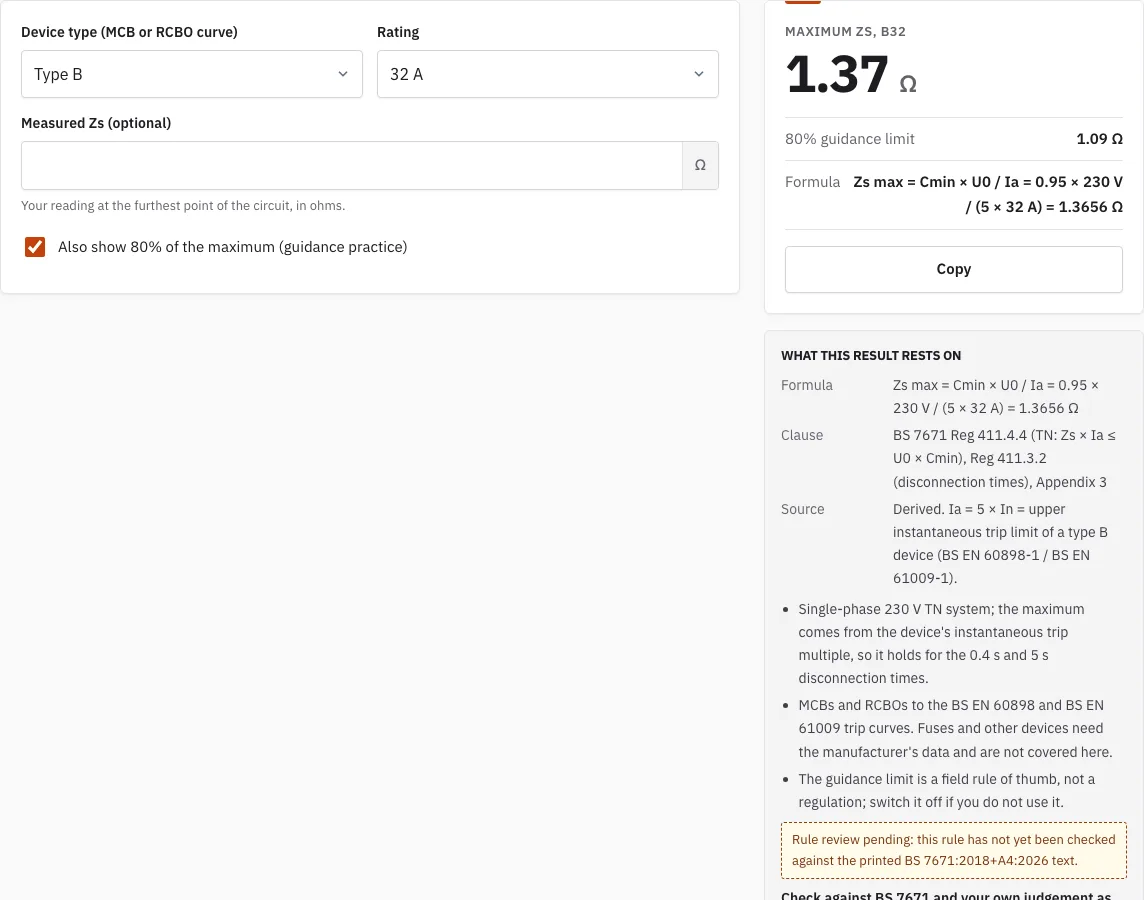
Maximum Zs, B32
Ω
- 80% guidance limit
- 1.09 Ω
- Formula
- Zs max = Cmin × U0 / Ia = 0.95 × 230 V / (5 × 32 A) = 1.3656 Ω
Free · runs in your browser · nothing is uploaded
How to use the Max Zs Calculator
- Choose the device type: B, C or D.
- Select the rating, from 6 to 125 A.
- Optionally, type in the Zs you measured, in ohms.
- Read the maximum Zs shown on the page.
- Check the result. It will say the reading is within the maximum, within the maximum but above the guidance limit, or over the maximum.
- If you want to see or hide the guidance limit, use the guidance tick box.
The link in the address bar keeps the device type, the rating and your reading, so you can open the same result again or send it to a colleague. To keep a value for a circuit on a certificate, you can type it into the certificate editor, which is the route for fuses and other devices whose maximum Zs you have from the manufacturer.
Change the device or the rating and the result updates at once; the guidance tick box changes only the middle outcome. The maximum depends on both the type and the rating, so double-check the label on the breaker before you read the result. Where the circuit is protected by an RCBO, choose its curve type (B, C or D) in the same way as for an MCB.
How is the maximum Zs worked out?
The maximum Zs is the highest earth loop impedance a circuit can have and still disconnect in time under an earth fault. The calculator divides 0.95 x 230 V by k x rating, and k depends on the device type. The formula follows BS 7671 (Regulations 411.4.4 and 411.3.2, and Appendix 3).
Maximum Zs = 0.95 x 230 V / (k x rating)
| Device type | k |
|---|---|
| B | 5 |
| C | 10 |
| D | 20 |
A higher k gives a lower maximum, which matches devices that need a larger fault current to trip quickly.
For example, a type B 32 A device gives 0.95 x 230 / (5 x 32) = 1.37 ohms. 80% of that is 1.09 ohms. A reading of 1.2 ohms is within the maximum but above the guidance limit. A reading of 1.5 ohms is over the maximum, which means the circuit may not disconnect in time.
Which devices does it cover?
MCBs and RCBOs to the BS EN 60898 and BS EN 61009 trip curves, types B, C and D, with ratings from 6 to 125 A. The maximum depends on the instantaneous trip current, so a type D device of a given rating has a much lower maximum than a type B of the same rating. Fuses are left out because their limit comes from a time-current curve that only the manufacturer’s data gives.
What does the 80% guidance limit mean?
The guidance limit is 80% of the maximum Zs. A reading below the maximum but above this limit is allowed, yet it leaves little margin, so it is worth a second look. The limit is a field practice, not a regulation, and the guidance tick box can be switched off if you do not want it.
Every result is a prompt for the certifying electrician, who makes the final decision on the circuit. A reading near the limit should be checked again, and the result is never a pass or fail verdict on its own.
What do typical values look like?
A few worked values for type B devices, from 0.95 x 230 V / (5 x rating): 6 A gives 7.28 ohms, 10 A gives 4.37 ohms, 16 A gives 2.73 ohms and 32 A gives 1.37 ohms. A type C 32 A device gives 0.68 ohm and a type D 32 A device 0.34 ohm. The full list for every rating is on the Maximum Zs Values page.
How this tool works and where the numbers come from
Maximum Zs is calculated as Cmin x U0 / Ia from BS 7671 Regulation 411.4.4 and Appendix 3.
Sources
- BS 7671:2018+A4:2026 Requirements for Electrical Installations (IET Wiring Regulations): publisher page, bibliographic reference; not checked against the printed text (BS 7671:2018+A4:2026) · checked
- IEC 61009-1 (BS EN 61009-1): RCBOs, bibliographic reference for RCD trip times and tripping curves (Edition 4.0, published 2024-11-21) · checked
Frequently asked questions
Why compare a measured Zs with the maximum?
The measured Zs shows the circuit as it actually is, and the maximum is the highest value at which the protective device still disconnects an earth fault in time. The calculator gives you the maximum to compare your reading against.
What if my reading is within the maximum but above the guidance limit?
The reading is still within the maximum, so it is not over it. The tool flags it because it is close to the edge. Check the circuit and retest if you are unsure, and let the certifying electrician decide what to record.
What does it mean if my reading is over the maximum?
A reading over the maximum Zs means the circuit may not disconnect in time under an earth fault. Treat it as a fault to investigate, not a number to round off. Check the connections and the circuit before deciding on the next step.
Can I use the calculator for fuses?
No. Fuses and other devices are not in the calculator. Their maximum Zs comes from the manufacturer’s data, and the certificate editor lets you type that value for a circuit.
Can I switch off the guidance limit?
Yes. The 80% guidance factor is a tick box, so you can turn it off if you only want to check against the maximum. It is a field practice, not a regulation.
How do I share a result?
Copy the link from the address bar. It keeps the device type, the rating and your reading, so the person you send it to sees the same result.
Related tools
- Maximum Zs Values for MCBs and RCBOs: use it to look up limits for common breakers without entering a reading.
- Earth Fault Loop Impedance Calculator: use it when you want to work through the loop impedance of a circuit.
- Prospective Fault Current Calculator: use it to estimate the fault current available at a point in the installation.
- Ring Final Circuit Test Calculator: use it when you are testing a ring final circuit.
- RCD Test: Trip Time Checker: use it to check whether an RCD trips within the expected time.
- Insulation Resistance Test: Test Voltage and Minimum: use it to find the test voltage and minimum reading for insulation resistance.
- Earth Electrode Resistance (Ra) Checker: use it to check an earth electrode resistance reading.
- EICR Certificate Maker: use it to record your results on an EICR certificate.
- EICR Codes: C1, C2, C3 and FI: use it when you need to classify an observation on an inspection.